

How to run OpenClaw on a $599 Mac Mini and automate your entire content operation
YOUR FREE AI CMO SETUP GUIDE
What you're building
An AI agent that runs 24/7 on your own hardware, connects to your WhatsApp or Telegram, writes posts, schedules content across platforms, monitors competitors every morning, and sends you a daily brief — no subscriptions, no agency fees.
One-time cost: $599. Breaks even in under 60 days versus hiring an agency.


What you need
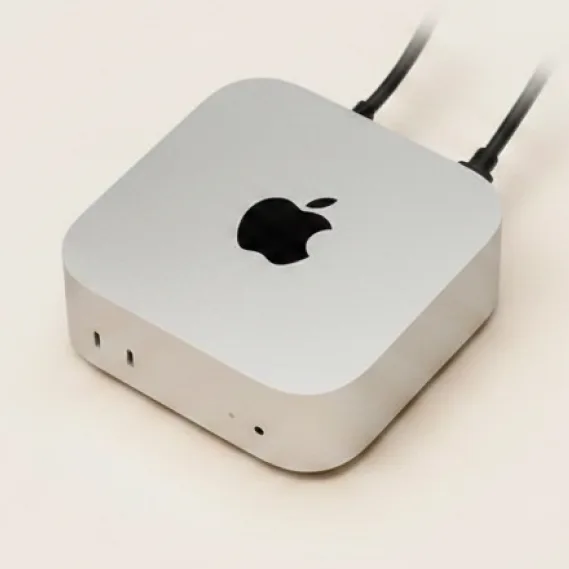
- Mac Mini M4, 16GB RAM ($599) — the base model is enough
- An Anthropic API key (claude.ai/api) — this is the brain
- A Telegram account (easiest way to connect)
- About 30 minutes
Step 1: Set up your Mac Mini
Plug it in, go through the basic macOS setup. You don't need a monitor after this — everything runs headless from your laptop.
Go to System Settings, open Privacy & Security, and grant Terminal these three permissions:
- Full Disk Access
- Accessibility
- Screen Recording
After toggling each one on, close Terminal and reopen it. If you skip this, OpenClaw breaks in ways that are hard to debug.
Step 2: Install Node.js and OpenClaw
Open Terminal and run these commands one by one:
/bin/bash -c "$(curl -fsSL https://raw.githubusercontent.com/Homebrew/install/HEAD/install.sh)"brew install nodenpm install -g openclawThen run the setup wizard:
openclaw onboard --install-daemonThis walks you through everything: gateway config, API key setup, and connecting your first messaging channel. The --install-daemon flag means OpenClaw starts automatically every time the Mac Mini boots.
Step 3: Connect Claude as the brain
When the onboarding wizard asks for your AI provider, choose Anthropic and paste your API key. This is what powers all the writing, research, and scheduling.
Recommended model: claude-sonnet-4 — fast, cost-effective, handles everything you need.
Step 4: Connect Telegram
In the onboarding wizard, select Telegram as your channel. You'll get a QR code or a bot token setup — follow the prompts. Once connected, open Telegram on your phone and message your agent. If it replies, you're live.
Telegram is the fastest to set up. WhatsApp works too but requires an extra step with a second phone or the Business app.
Step 5: Set up your content agent
Once the gateway is running, tell your agent what it's responsible for. Send this message in Telegram:
"You are my content manager. Every morning at 7am, send me a summary of what our top 3 competitors posted yesterday. Write 3 social media posts based on trends in [your niche]. Schedule them using [your scheduling tool]. Sign off every brief with a one-line recommendation for what I should focus on today."
Adjust the niche and tools to your business. The agent remembers your instructions across sessions.
Step 6: Keep it running 24/7
On your Mac Mini, go to System Settings, Battery, and turn off "Put hard disks to sleep when possible." Then set the display to never sleep.
To check that your agent is alive at any time, run:
openclaw statusIf something stops, run:
openclaw gateway startTroubleshooting
- ▸ Agent not responding after a reboot — run 'openclaw gateway status', then 'openclaw gateway start' if it's not running.
- ▸ High API costs — switch sub-tasks to claude-haiku in your config. Use Sonnet only for the main writing.
- ▸ Can't connect remotely — install Tailscale on both your Mac Mini and laptop. This gives you a secure tunnel to your agent from anywhere in the world.
Want the done-for-you setup?
If you'd rather skip the terminal and have this built for your specific business, Olumide sets up AI infrastructure for founders and creators end to end — hardware config, agent setup, content workflows, all of it running on autopilot before you get off the call.
Book a session with Olumide hereAbout the hosts
 Yury Shishkin
Founder of 24.online, an AI platform built for e-commerce brands and sellers. It generates product visuals, listings, and packaging — everything a seller needs to compete on Amazon and Walmart without a full creative team. He works with sellers daily and builds AI tools that solve real operational problems.
Follow Yury on Instagram: @yury.ai Olumide Gbenro
Founder of Creatoor AI and one of the leading voices in AI content creation. With 250K+ followers, he builds AI infrastructure for founders and creators — from personal brand systems and AI avatars to full content operations that run without a team. His clients generate $100M+ in business.
Follow Olumide on Instagram: @olumide_gbenroQuestions? DM either of us on Instagram.